

Excellent
 reviews on
 Trustpilot
Free Delivery Minimum Spend €250
7 Days Support
18 Month's Warranty
- Admin Admin
- 18 Jul, 2025
Is your Apple Watch no longer lasting throughout the day? Before you take it in to trade it or get it repaired, it's worth checking your Apple Watch battery health. This will help you decide if it's time to have your battery replaced so your watch is running at its best and your trade-in value is maximized.
Why Apple Watch Battery Health Matters
The Apple Watch contains a lithium-ion battery that will degenerate over time and cause:
- Decreased battery life
- Random shutdowns
- Slower performance
Checking your battery capacity will give you an understanding of the condition of your watch before a trade-in, resale, or repair. If the battery health of your Apple Watch is low, replacement can significantly extend the life of your device.
How to Check Apple Watch Battery Health
Checking your Apple Watch battery health is a breeze:
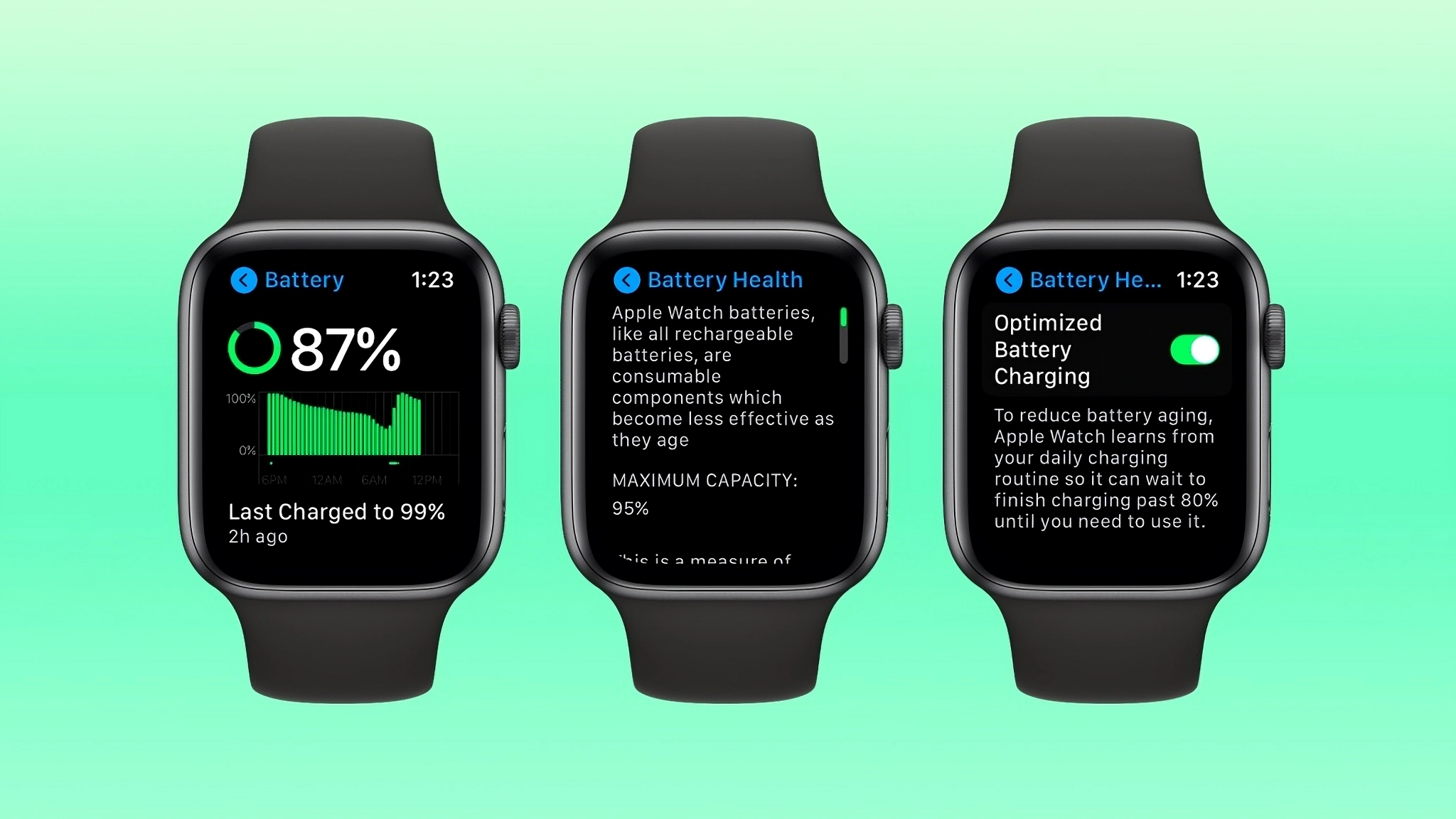
- Press the Digital Crown and open the Settings app.
- Tap Battery.
- Tap Battery Health.
- Take a look at the maximum capacity shown.
-
- 100% - 85%: Healthy battery
- 84% - 80%: Monitor this; consider replacing if battery life is poor
- Below 80%: Apple Watch battery time to replace
- 100% - 85%: Healthy battery
-
Tip: You can also enable Optimized Battery Charging here to slow down battery aging.
When to Replace Your Apple Watch Battery
You may want to replace Apple Watch batteries if:
- Your battery health is below 80%
- Your watch dies before the day ends
- You experience unexpected shutdowns
- You plan to trade in and want maximum value
Most Apple Watch batteries decline to 80% within 2-3 years of daily use. Replacing your battery can refresh your device at a lower cost than buying a new watch.
How to Make Your Apple Watch Battery Last Longer
Prior to replacing, use the following tips to enhance battery life:
- Turn on Low Power Mode when necessary
- Limit Always-On Display usage
- Turn off Background App Refresh
- Install the latest watchOS
- Avoid frequent full discharges
These are habits that lower battery wear and tear and make your Apple Watch last longer.
Trading in Your Apple Watch? Check Battery Health First
If you're trading your Apple Watch in with fone4u.ie, checking your battery health guarantees that:
- Finds true trade-in value
- Assists you in determining if a battery replacement will increase your resale value
- Avoids issues during your trade-in experience
At Fone4U, we offer:
- Apple Watch battery replacements at competitive prices
- Free battery health checks before trade-in
- Rapid turnaround battery fixes
- Fair trade-in valuations with honest battery health considerations
Book Your Apple Watch Battery Check with Fone4U
Don't let a dead battery slow down your Apple Watch's performance or worth. Whether for trade-in, resale, or just repairing a badly battered Apple Watch in Ireland, testing battery health is your initial smart option.
Phone Fone4u today and book a battery check or replacement of your Apple Watch and have your phone in top nick.