FONE4U · SELLING YOUR OLD PHONE
So you’ve got a new phone, and the old one is sitting in a drawer, looking at you.
Before you sell it, trade it in or hand it to your cousin; you need to wipe it properly. Not just delete a few photos and hope for the best. A proper wipe takes about ten minutes, and it’s the difference between your photos, messages, and bank apps going to the next owner or staying safely with you.
Get a quote for your old phone Ask us on WhatsApp
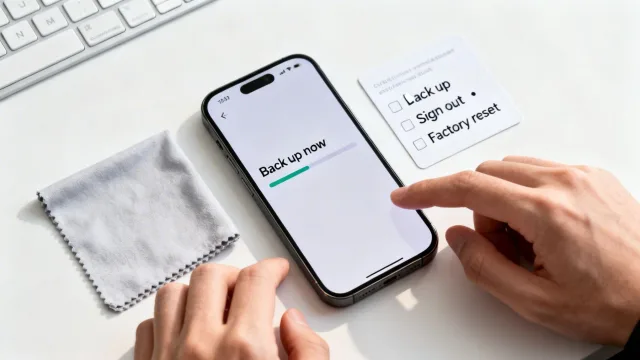
Before you start: your quick checklist
Here’s the whole thing at a glance. Tick these off as you go.
The order matters. Most of the problems people run into come from skipping step 3 and going straight to the reset.
Step 1: Back up everything you want to keep
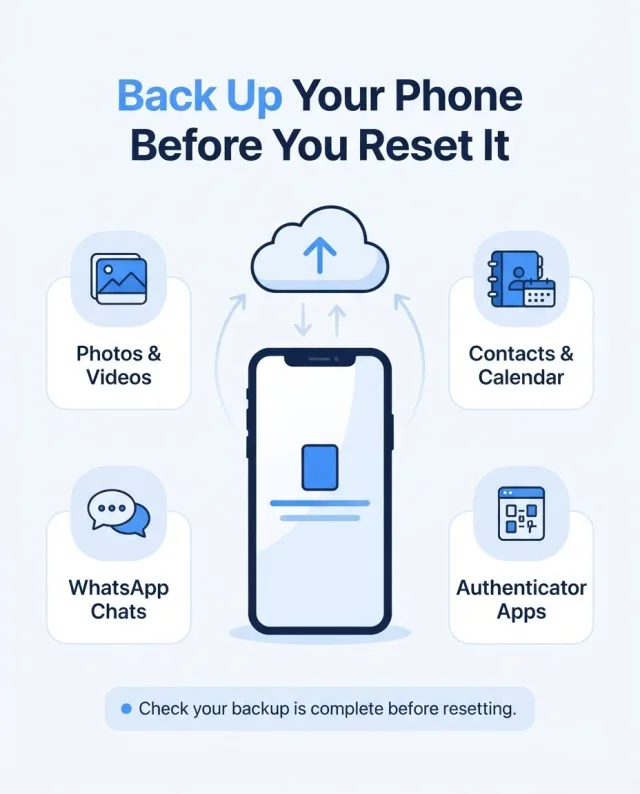
Once a phone is wiped, it’s gone for good. So take a minute to make sure nothing precious is left behind.
Photos and videos
iCloud Photos or Google Photos make this easy. Open the app and check that everything has finished uploading before you go any further.
Contacts and calendar
These usually sync to your Apple or Google account automatically, but it’s worth a quick look.
Open Settings, then Chats, then Chat Backup, and back up now. Don’t skip this one. Lost chats are the thing people regret most.
Everything else
If you’re moving straight to a new phone, the easiest route is to transfer directly, using Quick Start on iPhone or Smart Switch on Samsung. Do this before you wipe the old phone.
Don’t forget your authenticator apps. If you use Google Authenticator, Microsoft Authenticator, or similar for banking or work logins, move them across to your new phone first. If you wipe the old phone before you do, getting back into those accounts can be a real headache.
Step 2 (iPhone): Sign out and erase
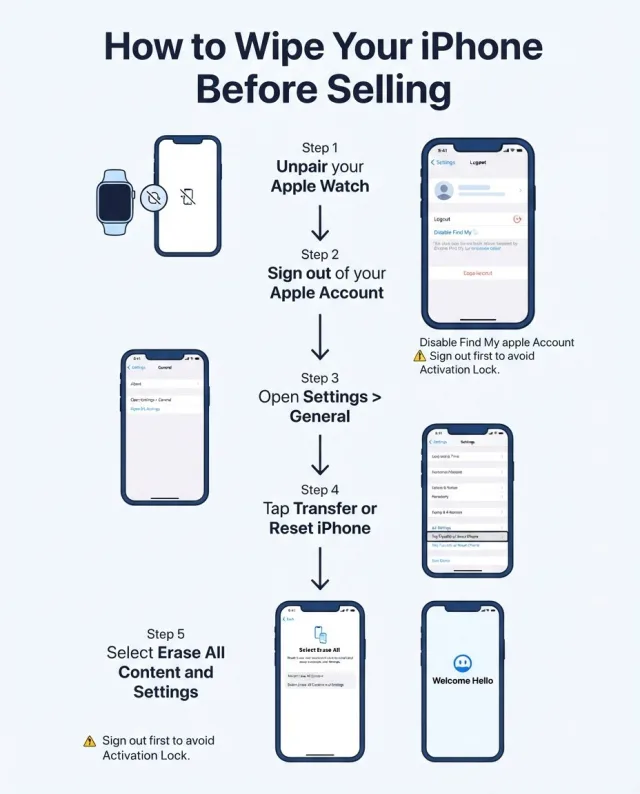
If you’re wiping an iPhone, this is the order to follow.
When the phone restarts and shows "Hello," you’re all set.
Step 2 (Samsung and other Android phones): Remove accounts and reset
Exact menu names vary a little between brands, but the idea is the same.
On other brands such as Pixel, Xiaomi, or Oppo, look for Settings > System > Reset options > Erase all data.
Step 3: Take out your SIM and memory card
This one’s easy to forget, and it matters. Your SIM card holds your phone number, and a memory card can hold photos you’ve never backed up.
- Use a SIM tool or a small paperclip to pop out the tray.
- Check both sides of the tray for a micro-SD card.
- If your phone uses an eSIM, make sure it was removed during the reset. If you’re not sure, your network can help.
Step 4: Check that it’s really clean
Turn the phone on one last time. You should see a welcome or setup screen with no sign of your name, photos, apps, or accounts. If you do see any of those, repeat the reset.
If you want to go the extra mile, remove the case and give the phone a quick wipe down, and take off any screen protector you’re not leaving with it. A tidy phone gets a better price.
What about my banking apps and passwords?
A factory reset removes them from the phone. Modern iPhones and Android phones encrypt your data by default, so the wipe is safe and effective for normal selling.
Still, if you want peace of mind, do these things on a laptop or your new phone:
- Log out of your banking and email accounts everywhere you’re signed in.
- Change passwords for anything especially sensitive.
- Check your Apple Account or Google account for devices you no longer use, and remove the old phone from the list.
Common mistakes to avoid
Phone wiped? Turn it into cash.
Get a quick quote on our Sell your device page.
Sell your device Message us on WhatsAppFrequently Asked Questions
Do I need to wipe my phone if I’m trading it in?
Yes. Always wipe it yourself first, even if the shop says they’ll do it as well. It’s your data, and the safest person to protect it is you.
Will a factory reset delete everything permanently?
On modern iPhones and Android phones, yes. Your data is encrypted, and a reset removes the key that unlocks it, so it can’t be recovered in any normal way.
What if my phone is broken or the screen is cracked?
If you can still see and use the screen, follow the steps above. If you can’t, you may be able to sign out and erase it remotely, using iCloud.com/find for iPhone or Google Find My Device for Android. Or bring it into one of our shops and we’ll talk you through your options.
What if I forgot my Apple or Google password?
Reset it with Apple’s or Google’s account recovery pages before you sell. Without it, the phone could stay locked to you.
How long does it take to wipe a phone?
About ten minutes, plus however long your backup takes.
What is Activation Lock on an iPhone?
If Find My iPhone is still on when someone buys the phone, it can be Activation Locked to your account. The new owner can’t use it until it’s unlocked. Signing out of your Apple Account before you erase the phone switches Find My iPhone is off.
What is Factory Reset Protection on Android?
It’s the Android version of Activation Lock. Remove your Google account (and your Samsung account, on Samsung) before you reset the phone, and Factory Reset Protection switches off.
Do I need to take out my SIM card and memory card?
Yes. Your SIM card holds your phone number, and a memory card can hold photos you’ve never backed up. Check both sides of the SIM tray for a micro-SD card. If you use an eSIM, make sure it was removed during the reset, or ask your network.
Do I need to unpair my Apple Watch and Bluetooth devices?
Yes. Unpair your Apple Watch before you sign out and erase the iPhone, and unpair any Bluetooth devices too.
How do I back up my WhatsApp chats before wiping my phone?
Open WhatsApp, go to Settings, then Chats, then Chat Backup, and back up now. Do it before you wipe the phone, because lost chats are the thing people regret most.
What should I do with my authenticator apps?
Move them to your new phone first. If you use Google Authenticator, Microsoft Authenticator, or something similar for banking or work logins, wiping the old phone before you do can make it hard to get back into those accounts.
Is deleting my photos and apps enough before selling?
No. Deleting photos and apps isn’t the same as wiping the phone. You need to sign out of your account and do a full factory reset.
Can I just factory reset without signing out first?
It’s the biggest mistake people make. Resetting before signing out can leave the phone locked to your account, which stops the next owner from using it. Always sign out (or remove your accounts) first.
How do I know the phone is really clean?
Turn it on one last time. You should see a welcome or setup screen with no sign of your name, photos, apps, or accounts. If you see any of those, repeat the reset.
What if I get stuck on one of the steps?
Pop into one of our shops in Bray, Ballina, or Sligo, or message us on WhatsApp, and we’ll happily help you through it.
Ready to sell your old phone?
Once your phone is wiped, you’re ready to turn it into cash. Get a quick quote on our Sell your device page, or call into your nearest Fone4U shop in Bray, Ballina or Sligo. If you’re not sure what it’s worth, our guide on how much your old iPhone is worth is a good place to start.
Get a quote: Sell your device Bray shop Ballina shop Sligo shop Message us on WhatsAppStuck on any of the steps? Pop into a shop or message us on WhatsApp and we’ll happily help you through it.